
Universal CNC Panel Simulator with Machine Simulation
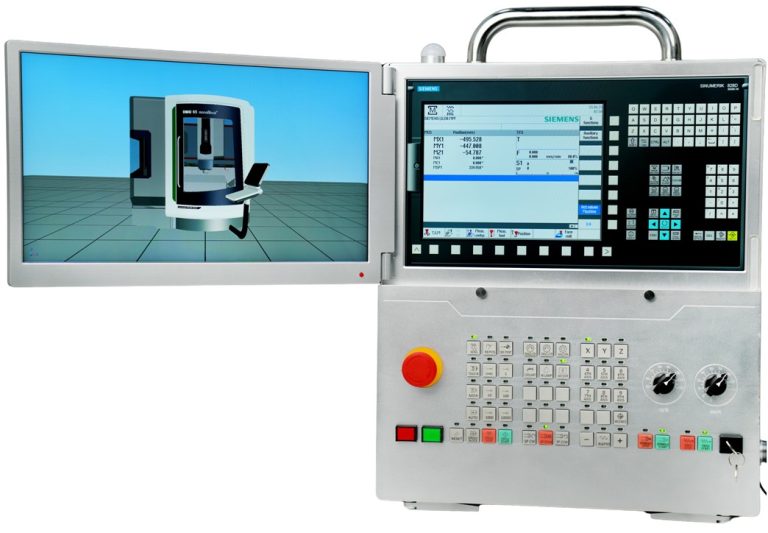
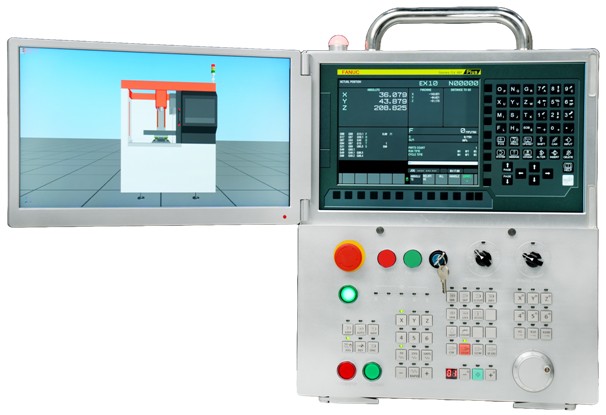
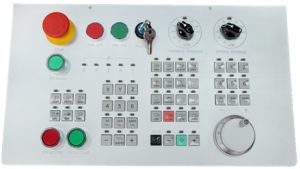
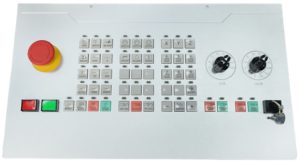
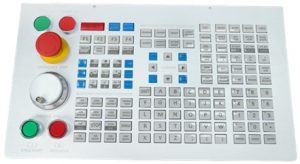
Unlock the future of CNC training and manufacturing education with the Universal CNC Panel Simulator. Designed with versatility and user-centric innovation, this simulator bridges the gap between classroom learning and real-world shop floor operations. Its standout feature – the interchangeable keyboard system – allows users to seamlessly switch between Siemens, FANUC, and Haas panels, giving learners and professionals a true multi-brand experience without the need for multiple hardware setups.
Built for universities, technical institutions, and training centers, the simulator offers an immersive, hands-on environment where learners can master programming, machining operations, and troubleshooting. By simulating authentic CNC panel interfaces, it empowers students and engineers to gain industry-ready skills, while organizations save significantly on equipment costs and training time.
Why Choose the Universal CNC Panel Simulator?
Seamless Multi-Panel Experience
Instantly switch between Siemens, FANUC, and Haas panels with modular keyboard swapping.
Cost-Effective Training
One simulator delivers the experience of three, reducing the need for multiple machines.
Industry-Ready Learning
Provides authentic control panel operation and enhances employability of learners.
Robust & Scalable
Designed for durability, classroom scalability, and integration with CNC software and machines.
Selection of Modules
Fanuc 2/3/4/5 CNC Machine Simulation Panel with 2/3 axis simulation software
Siemens 2/3/4/5 axis CNC Machine Simulation Panel with 2/3 axis simulation software
Haas 2/3/4/5 axis CNC Machine Simulation Panel with 2/3 axis simulation software
Controller:
FANUC 0iTF Plus
FANUC 0iMF Plus
FANUC 31i Model B5 (4/5 axis)
Controller:
Siemens 828DT
Siemens 828DM (3/4/5 axis)
Controller:
Haas ST
Haas VM (3/4/5 axis)
Technical Specifications
| Specifications | CPS- Universal ( Fanuc / Siemens / HASS ) |
| External dimensions [mm] | 430 x 140 x 585 (W x D x H) |
| Weight [kg] | 13.0 |
| Display device | 15.6“LCD with 10 points capacitive touch function and 15.6“ LCD with 10 points capacitive touch function. |
| Operation section | FANUC: Virtual CNC Controller and MDI (Fanuc 0iMF Plus and other Fanuc family Controller key) unit (also support plugin keyboard). Machine operator ‘s panel Emergency stop button Override switch Manual pulse generator universal power unit Programs protect key. Machine ready button SIEMENS: Virtual CNC Controller and MDI (Siemens 828D and other Siemens family Controller key) unit (also support plugin keyboard).
Machine operator ‘s panel HAAS: Virtual CNC Controller unit (also support plugin keyboard). Machine operator ‘s panel |
| Input and output media | USB memory, HDMI |
| Communication I/F | Ethernet (RJ45) |
| Input rating | 100 VAC to 240 VAC, 2.0A, 50-60Hz |
| Other | Folding bracket |
| System (switching possible) | FANUC: Fanuc 0iMF Plus (3 Axis) Fanuc 0iTF Plus Fanuc 21iM (3 Axis) Fanuc 21iT Fanuc 31i Model B (4-5 Axis) SIEMENS: SIEMENS 828DM (3 Axis) SIEMENS 828DT SIEMENS 808DM (3 Axis) SIEMENS 808DT SIEMENS 840DM (4-5 Axis) HAAS: HAAS VM(3 Axis) HAAS ST HAAS VM(4-5 Axis) |
| Display mode | 11 languages (English, German, French, Spanish, Chinese (Simplified), Korean, Magyar, Portuguese, Polish, Russian, Turkish) |
| Import NC program or edit program with MDI unit and 3D simulation | |
| Inch / metric switchable | |
| FANUC: 10MB part program storage, with 1024 registered programs
SIEMENS: HAAS: | |
| FANUC: 400 Tool offset pairs (T) and 400 Tool offset pairs (M)
SIEMENS: HAAS: | |
| FANUC: Work piece coordinates G52-G59 + 48 additional on mill and Lathe
SIEMENS: HAAS: | |
| Possibility to connect to a computer network. |
Feature and Capabilities of Universal CNC Simulator
1. Select machine model
2. Select and set workpiece
3. Select and set tool
4. Select and set clamp
5. Rapid simulation
6. Set workpiece zero by manual
7. Import NC program
8. Import custom clamp (.stl format for milling)
9. Debug NC trace
10. Measure workpiece
11. Collision detected
12. Alarm warning
13. Cutting workpiece in real-time
14. Simulation real machine operational panel
15. Switch machine model: AUTO, REF, JOG, MDI, WHEEL and EDIT
16. Hand wheel operation
a) Select current NC program
b) Single block function
c) Operate wheel
17. AUTO operation
a) Select current NC program
b) Single block function
c) Skip block function
d) Select stop function
e) Simulate the NC program
18. Machine alarm light
19. MDI operation
a) Input NC program
b) Program protect function
c) Simulate the NC program
20. JOG operation
a) Rapid feed and control rapid federate override
b) Normal feed and control normal federate override
c) Spindle CCW and CW and STOP
d) Control spindle override
e) JOG spindle
f) Open and close machine port
g) Open and close coolant
h) Change tool by manual and show the tool no
21. EDIT operation
a) New NC program
b) Input NC code
c) Edit NC code
d) Program protect function
22. Emergency stop
23. Support coolant, sound and iron fragment effect.
24. Switch 3D shown mode
25. Show tool trace
26. Show tool number
27. Transfer and Simulate NC codes from CAM software